Fakeymacs無きKeyhac2のconfig.pyの設定の例
日常的なファイルのコピペもCtrl+Y でやってしまうEmacsに手癖をカスタマイズされた人間としては、keyhac + Fakeymacs は非常に便利なツールでした。新しいPCをセットアップする際に改めてkeyhacのインストールをしようとすれば、なんとKeyhac2がリリースされていて、Microsoft Storeアプリとしてインストールできるようになったとな。使う側としては安心&アップデートにも便利。
https://crftwr.github.io/keyhac
そうなると、設定ファイルのFakeymacs ですが、こちらはまだKeyhac2には対応していない。というかAPIが変わっちゃったので、おそらくは別に作り直す必要が出てきそう。
https://github.com/smzht/fakeymacs
無いものは作るしかないので、とりあえず必要最低限の分を作ってみたので共有します。細かい使い心地の部分については”Fakeymacs-style key bindings”以下の部分をよしなに調整してみてください。
Winでしか試していないのでMacで変だったらゴメンです。
クリップボード履歴&定型文については、Alt+Y にバインドしてます。アプリランチャーはAlt+l に割り当ててますが、適当に変えて使ってください。クリップボード履歴のUIはkeihac2で結構変わってますので、まあ何となく近い操作感になればいいやくらいにしてます。
リージョン選択については、まだ未実装です。そのうち余裕ができたらやります。
困ったポイントとしては、Win+Ctrl+左右キーで仮想デスクトップの切り替えを行っていたのですが、こいつが動かなくなってしまい、結局、Winキーを"LUser0″に割り当てるのをやめました。LEADERは個別に設定するようにしたので問題無いと思いますが、"LUser0/User0″を使って設定を入れている人はご注意ください。たぶん動かなくなるか、挙動がおかしくなると思います。
"""Keyhac 2 configuration file.
This file is copied to ~/.keyhac/config.py on first run. Edit that copy —
Keyhac reloads it from the tray menu or the console's hook toggle.
The same file runs on Windows and macOS. Where the OSes genuinely differ,
branch on `keymap.platform`; the two constants set up at the top (LEADER and
MOD) absorb most of it, so the samples below rarely have to.
Everything here is a working example, not pseudo-code. Delete what you do
not want.
"""
import json
from keyhac import *
from keyhac.core.keymap import Keymap
from keyhac.core.const import MODKEY_SHIFT
from keyhac.core.const import MODKEY_ALT
from keyhac.core.const import MODKEY_CTRL
from keyhac.core.const import MODKEY_WIN
from keyhac.core.const import MODKEY_CMD
from keyhac.core.const import MODKEY_FN
from keyhac.ui.chooser import ChooserWindow
from puikit.event import EventType
logger = getLogger("Config")
_EVENT_MODKEYS = {
"shift": MODKEY_SHIFT,
"ctrl": MODKEY_CTRL,
"alt": MODKEY_ALT,
"win": MODKEY_WIN,
"cmd": MODKEY_CMD,
}
def configure(keymap):
mac = keymap.platform == "mac"
# ==================================================================
# Setup
# ==================================================================
# --- user modifier -------------------------------------------------
# Turn a key into User0, a modifier of your own that no application
# sees. User0-User3 are available; a key used this way is never
# emitted, so it loses its original meaning while defined.
if mac:
# The right Option key; it stops acting as Option.
keymap.define_modifier("RAlt", "RUser0")
else:
# The left Windows key; the Start menu no longer opens on a tap
# (bind kt["O-LWin"] = "LWin" below if you want that back).
# keymap.define_modifier("LWin", "LUser0") # 仮想デスクトップ切り替えがうまくいかないので、Winキーを開放
pass
# --- the two portability constants ---------------------------------
# LEADER: the modifier most samples below hang off.
# macOS - the Fn key, which Windows does not expose to software
# Windows - User0, i.e. the left Windows key defined just above
# LEADER = "Fn" if mac else "User0" # 上記の変更に伴い、"User0"
LEADER = "Fn" if mac else "LWin"
# MOD: the OS's primary shortcut modifier, so one binding can mean
# "Cmd-C" on macOS and "Ctrl-C" on Windows.
MOD = "Cmd" if mac else "Ctrl"
# --- swap a key entirely (uncomment to try) ------------------------
# replace_key runs before any key table, so the rest of the config
# only ever sees the replacement.
# keymap.replace_key("CapsLock", "LCtrl")
# --- text editor for "Edit Config" ---------------------------------
# The tray menu's "Edit Config" opens this file. Unset, a default is
# picked (VS Code / Xcode / TextEdit on macOS, Notepad on Windows).
# Name an editor application, or set a callable taking the path:
# keymap.editor = "CotEditor" if mac else "notepad.exe"
# --- clipboard history ---------------------------------------------
keymap.clipboard_history.max_items = 500
keymap.clipboard_history.max_data_size = 10 * 1024 * 1024
# ==================================================================
# Global key table (active everywhere)
# ==================================================================
kt = keymap.define_keytable(focus_path_pattern="*")
# ==================================================================
# Fakeymacs-style key bindings
# ==================================================================
# Basic Emacs cursor movement.
kt["Ctrl-B"] = "Left"
kt["Ctrl-F"] = "Right"
kt["Ctrl-P"] = "Up"
kt["Ctrl-N"] = "Down"
kt["Ctrl-A"] = "Home"
kt["Ctrl-E"] = "End"
# Word movement.
kt["Alt-B"] = "Ctrl-Left"
kt["Alt-F"] = "Ctrl-Right"
# Page movement.
kt["Ctrl-V"] = "PageDown"
kt["Alt-V"] = "PageUp"
# Delete / kill.
kt["Ctrl-D"] = "Delete"
kt["Alt-D"] = "Ctrl-Delete"
kt["Alt-Back"] = "Ctrl-Backspace"
kt["Ctrl-K"] = "Shift-End", "Ctrl-C", "Delete"
kt["Ctrl-H"] = "Back"
# Clipboard.
kt["Ctrl-W"] = "Ctrl-X"
kt["Alt-W"] = "Ctrl-C"
kt["Ctrl-Y"] = "Ctrl-V"
# Newline / undo / cancel.
kt["Ctrl-M"] = "Enter"
kt["Ctrl-J"] = "Enter"
kt["Ctrl-O"] = "Enter", "Left"
kt["Ctrl-Slash"] = "Ctrl-Z"
kt["Ctrl-G"] = "Esc"
# Search.
kt["Ctrl-S"] = "Ctrl-F"
kt["Ctrl-R"] = "Ctrl-Shift-F3"
# --------------------------------------------------------------
# Fakeymacs-like C-x prefix
# --------------------------------------------------------------
kt_x_emacs = keymap.define_keytable(name="Emacs-C-X")
kt["Ctrl-X"] = kt_x_emacs
kt_x_emacs["H"] = "Ctrl-Home", "Ctrl-A" # mark whole buffer
kt_x_emacs["Ctrl-F"] = "Ctrl-O" # open
kt_x_emacs["Ctrl-S"] = "Ctrl-S" # save
kt_x_emacs["K"] = "Ctrl-F4" # close tab/window
kt_x_emacs["U"] = "Ctrl-Z" # undo
kt_x_emacs["Ctrl-C"] = "Alt-F4" # quit
# --------------------------------------------------------------
# Clipboard history + categorized preset snippets
#
# Alt-Y opens a custom chooser. Left/Right switches categories,
# Up/Down selects an item, Enter pastes it, and Shift-Enter only
# copies it to the clipboard.
#
# The categories below are intentionally easy to customize.
# Each category is: (icon, label, text/callable).
# --------------------------------------------------------------
clipboard_categories = [
("📋 履歴", None), # populated dynamically
("📧 メール", [
("📧", "メールアドレス", "me@example.com"),
("✍", "署名", "よろしくお願いいたします。"),
]),
("💻 開発", [
("🔗", "GitHub", "https://github.com/"),
("🐍", "Python", "```python\n\n```"),
("📝", "Markdown code block", "```\n\n```"),
]),
("🕒 日時", [
("📅", "YYYY-MM-DD", DateTimeSnippet("%Y-%m-%d")),
("🕒", "YYYY-MM-DD HH:MM:SS",
DateTimeSnippet("%Y-%m-%d %H:%M:%S")),
("📁", "YYYYMMDD_HHMMSS",
DateTimeSnippet("%Y%m%d_%H%M%S")),
]),
]
class CategorizedChooserWindow(ChooserWindow):
"""ChooserWindow with Left/Right category switching."""
def __init__(self, backend, categories, *args, **kwargs):
self._categories = categories
self._category_index = 0
self._category_titles = [c[0] for c in categories]
self._filter_text = ""
super().__init__(backend, self._category_items(), *args, **kwargs)
def _category_items(self):
title, items = self._categories[self._category_index]
return list(items)
def _category_header(self):
n = len(self._categories)
title = self._category_titles[self._category_index]
return f"← {title} → ({self._category_index + 1}/{n})"
def _labels(self):
# Put the category indicator at the top of the chooser.
return [self._category_header()] + [
f"{item[0]} {item[1]}" if item[0] else item[1]
for item in self._filtered
]
def _on_filter_change(self, text: str) -> None:
# Category header is not part of filtering.
self._filter_text = text
words = [w for w in text.lower().split() if w]
items = self._category_items()
self._filtered = [
item for item in items
if all(w in item[1].lower() for w in words)
]
self._list.set_items(self._labels())
self._list.selected = 1 if self._filtered else 0
self.panel.render()
def _switch_category(self, delta):
self._category_index = (
self._category_index + delta
) % len(self._categories)
# Re-apply the current filter to the new category. This
# avoids relying on undocumented TextEdit methods.
self._on_filter_change(self._filter_text)
def _on_event(self, event) -> None:
if event.type is EventType.KEY:
if event.key == "left":
self._switch_category(-1)
return
if event.key == "right":
self._switch_category(+1)
return
# The first row is the category header. Skip over it
# when navigating with Up/Down.
if event.key in ("up", "down", "pageup", "pagedown"):
delta = {
"up": -1,
"down": 1,
"pageup": -10,
"pagedown": 10,
}[event.key]
if self._filtered:
selected = self._list.selected - 1
selected = max(
0,
min(len(self._filtered) - 1, selected + delta),
)
self._list.selected = selected + 1
self.panel.render()
return
if event.key == "enter":
# Don't select the category header itself.
index = self._list.selected - 1
if 0 <= index < len(self._filtered):
mod = 0
for name in event.modifiers:
mod |= _EVENT_MODKEYS.get(name, 0)
self._finish(self._filtered[index], mod)
return
self.panel.dispatch_event(event)
self.panel.render()
class CategorizedClipboardChooser(ChooserAction):
"""Fakeymacs-style clipboard/snippet chooser with categories."""
_open = None
def __init__(self, categories):
self.categories = categories
def __repr__(self):
return "CategorizedClipboardChooser()"
def _make_categories(self):
categories = []
for title, items in self.categories:
if items is None:
# Clipboard history: Keyhac 2 returns (text, label).
history = Keymap.get_instance().clipboard_history
history_items = [
("📋", label, text)
for text, label in history.items()
]
categories.append((title, history_items))
else:
categories.append((title, list(items)))
return categories
def __call__(self):
from keyhac.ui import runtime
from keyhac.ui.chooser import ChooserWindow
if runtime.backend is None:
logger.error(
"CategorizedClipboardChooser requires the Keyhac UI."
)
return
keymap = Keymap.get_instance()
# Close an already-open categorized chooser.
if self._open is not None:
old_window, old_pid = self._open
old_window.dismiss()
self._open = None
if old_pid is not None and keymap.app_control is not None:
keymap.app_control.activate_pid(old_pid)
return
focus = keymap.focus
original_pid = focus.pid if focus else None
def refocus():
if original_pid is not None and keymap.app_control is not None:
keymap.app_control.activate_pid(original_pid)
def selected(item, modifier_flags):
self._open = None
refocus()
value = item[2] if len(item) > 2 else item[1]
if callable(value):
value = value()
if value is None:
return
keymap.clipboard_history.set_current(str(value))
# Shift-Enter = clipboard only.
if modifier_flags & MODKEY_SHIFT:
return
# Normal Enter = paste into the original application.
runtime.backend.call_later(
0.15,
lambda: self._paste(),
)
def canceled():
self._open = None
refocus()
center_on = clamp_to = None
active = keymap.get_active_window()
if active is not None:
center_on = active.get_frame()
if center_on is not None and keymap.window_provider is not None:
clamp_to = MoveWindow._get_best_screen(
center_on,
keymap.window_provider.screen_frames(),
)
categories = self._make_categories()
chooser = CategorizedChooserWindow(
runtime.backend,
categories,
on_selected=selected,
on_canceled=canceled,
title="Clipboard / Snippets",
center_on=center_on,
clamp_to=clamp_to,
)
self._open = (chooser, original_pid)
if keymap.app_control is not None:
import os
keymap.app_control.activate_pid(os.getpid())
def _paste(self):
keymap = Keymap.get_instance()
with keymap.get_input_context() as ctx:
ctx.send_key(
"Cmd-V" if keymap.platform == "mac" else "Ctrl-V"
)
kt["Alt-Y"] = CategorizedClipboardChooser(clipboard_categories)
# --------------------------------------------------------------
# Application launcher
#
# Alt-L opens a selectable application list.
# Add/remove entries here to match the applications you use.
# --------------------------------------------------------------
def show_application_launcher():
applications = [
("📝", "Notepad", "notepad.exe"),
("📁", "Explorer", "explorer.exe"),
("⌨", "Windows Terminal", "wt.exe"),
("💻", "PowerShell", "powershell.exe"),
("🌐", "Microsoft Edge", "msedge.exe"),
("🌐", "Google Chrome", "chrome.exe"),
("🧑‍💻", "Visual Studio Code", "code"),
]
entries = []
for icon, name, command in applications:
def launch(command=command):
LaunchApplication(command)()
entries.append((icon, name, launch))
ShowClipboardSnippets(entries)()
kt["Alt-L"] = show_application_launcher
# --- key -> key ----------------------------------------------------
# IJKL as arrow keys while LEADER is held.
kt[f"{LEADER}-I"] = "Up"
kt[f"{LEADER}-J"] = "Left"
kt[f"{LEADER}-K"] = "Down"
kt[f"{LEADER}-L"] = "Right"
kt[f"{LEADER}-U"] = "Home"
kt[f"{LEADER}-O"] = "End"
# --- key -> sequence of keys ---------------------------------------
# Select the whole line: Home, then Shift-End.
kt[f"{LEADER}-A"] = "Home", "Shift-End"
# --- one-shot: tap for one key, hold to modify ---------------------
# A one-shot key held down still works as its modifier; only a lone
# tap-and-release fires the assignment. Picked so a stray tap is
# harmless (an Escape here, say, would cancel dialogs mid-typing).
if mac:
# The classic macOS setup: tap Left/Right Cmd alone for Eisu/Kana
# (IME off/on) - a no-op unless a Japanese input source is
# installed. Held, they are still plain Cmd.
kt["O-LCmd"] = "Eisu"
kt["O-RCmd"] = "Kana"
else:
# Tap right Ctrl alone to open the Start-menu search; held, it is
# still plain Ctrl.
kt["O-RCtrl"] = "Win-S"
# --- key -> your own function --------------------------------------
def hello():
# print() and the logger both reach the console window.
print("Hello from config.py")
logger.info(f"platform={keymap.platform}")
kt[f"{LEADER}-H"] = hello
# --- typing literal text -------------------------------------------
kt[f"{LEADER}-Semicolon"] = InputText("me@example.com")
# --- sending keys from your own function ---------------------------
# get_input_context() batches virtual key input; it is safe to use from
# a worker thread as well (see the ThreadedAction sample below).
def wrap_in_quotes():
with keymap.get_input_context() as ctx:
ctx.send_key(f"{MOD}-C")
kt[f"{LEADER}-Q"] = wrap_in_quotes
# ==================================================================
# Clipboard
# ==================================================================
# --- history, in a chooser window ----------------------------------
# Enter pastes; Shift-Enter only sets the clipboard. Type to filter.
kt[f"{LEADER}-V"] = ShowClipboardHistory()
# --- fixed snippets -------------------------------------------------
# (icon, label) | (icon, label, text) | (icon, label, callable)
kt[f"{LEADER}-Shift-V"] = ShowClipboardSnippets([
("📧", "me@example.com"),
("📮", "Mailing address", "400 Broad St, Seattle, WA 98109"),
("🕒", "Date", DateTimeSnippet("%Y-%m-%d")),
("🕒", "Timestamp", DateTimeSnippet("%Y-%m-%d %H:%M:%S")),
("🕒", "For filenames", DateTimeSnippet("%Y%m%d_%H%M%S")),
])
# --- transform whatever is on the clipboard -------------------------
# A tool takes the clipboard text and returns the replacement.
def pretty_json(s):
try:
return json.dumps(json.loads(s), indent=4, ensure_ascii=False)
except json.JSONDecodeError:
logger.error("Clipboard content is not valid JSON.")
return s
kt[f"{LEADER}-Ctrl-V"] = ShowClipboardTools([
("🔄", "Quote", ShowClipboardTools.quote),
("🔄", "Unindent", ShowClipboardTools.unindent),
("🔄", "Upper case", str.upper),
("🔄", "Lower case", str.lower),
("🔄", "Half width", ShowClipboardTools.to_half_width),
("🔄", "Full width", ShowClipboardTools.to_full_width),
("🔄", "Pretty JSON", pretty_json),
])
# ==================================================================
# Windows and applications
# ==================================================================
# --- move the focused window ---------------------------------------
# Apple keyboards translate Fn-Arrow into Home/End/PageUp/PageDown in
# hardware (the Fn modifier itself still arrives), so with LEADER = Fn
# the "...-Left" spellings would never fire on macOS - bind the keys
# that actually arrive there. Ctrl/Alt rather than Shift, because
# Fn-Shift-Arrow is how you *select text* on a Mac laptop (it arrives
# as Shift-Home etc.) - a Shift binding here would steal it.
LEFT, RIGHT, UP, DOWN = (("Home", "End", "PageUp", "PageDown") if mac
else ("Left", "Right", "Up", "Down"))
# Nudge by 20 px...
kt[f"{LEADER}-Ctrl-{LEFT}"] = MoveWindow(direction="left", distance=20)
kt[f"{LEADER}-Ctrl-{RIGHT}"] = MoveWindow(direction="right", distance=20)
kt[f"{LEADER}-Ctrl-{UP}"] = MoveWindow(direction="up", distance=20)
kt[f"{LEADER}-Ctrl-{DOWN}"] = MoveWindow(direction="down", distance=20)
# ...or send it as far as it goes, stopping at other windows' edges
# and screen edges (and hopping to the next monitor when already there).
kt[f"{LEADER}-Alt-{LEFT}"] = MoveWindow(direction="left", distance=9999,
window_edge=True, screen_edge=True)
kt[f"{LEADER}-Alt-{RIGHT}"] = MoveWindow(direction="right", distance=9999,
window_edge=True, screen_edge=True)
kt[f"{LEADER}-Alt-{UP}"] = MoveWindow(direction="up", distance=9999,
window_edge=True, screen_edge=True)
kt[f"{LEADER}-Alt-{DOWN}"] = MoveWindow(direction="down", distance=9999,
window_edge=True, screen_edge=True)
# --- snap to screen regions (tiling) --------------------------------
# Resizes to a half of the window's current screen, inside the work
# area (menu bar, Dock and taskbar stay uncovered). Same IJKL layout
# as the arrows above. ratio= picks a different split, e.g.
# SnapWindow("left", ratio=2/3).
kt[f"{LEADER}-Ctrl-J"] = SnapWindow("left")
kt[f"{LEADER}-Ctrl-L"] = SnapWindow("right")
kt[f"{LEADER}-Ctrl-I"] = SnapWindow("top")
kt[f"{LEADER}-Ctrl-K"] = SnapWindow("bottom")
kt[f"{LEADER}-F"] = SnapWindow("full")
# --- minimize the focused window -------------------------------------
def minimize_window():
window = keymap.get_active_window()
if window is not None:
window.minimize()
kt[f"{LEADER}-M"] = minimize_window
# --- bring an application forward -----------------------------------
# Matches like the focus conditions below: wildcards, "|" alternation,
# case-insensitive, ".exe" optional.
kt[f"{LEADER}-1"] = ActivateWindow(app="code|Visual Studio Code")
kt[f"{LEADER}-2"] = ActivateWindow(app="chrome|Google Chrome")
# --- launch an application ------------------------------------------
if mac:
kt[f"{LEADER}-T"] = LaunchApplication("Terminal.app")
else:
kt[f"{LEADER}-T"] = LaunchApplication("wt.exe") # Windows Terminal
# --- inspect windows yourself ---------------------------------------
# keymap.get_active_window() / find_window() / list_windows() return
# portable Window objects: title, app_name, pid, class_name (Windows),
# get_frame(), set_frame(), activate(), minimize(), is_minimized(),
# restore(). Screen geometry: keymap.screen_frames() (whole screens),
# keymap.screen_work_frames() (minus menu bar / Dock / taskbar) and
# keymap.window_frames(). Window objects and screen_work_frames() are
# UI-thread only - never touch them from a ThreadedAction.run(); the
# thread-safe pair there is screen_frames() / window_frames().
def describe_window():
window = keymap.get_active_window()
if window is None:
logger.warning("No active window.")
return
x, y, w, h = window.get_frame()
logger.info(f"{window.app_name}: \"{window.title}\" "
f"at ({x:.0f},{y:.0f}) {w:.0f}x{h:.0f}")
logger.info(f"{len(keymap.list_windows())} windows open on "
f"{len(keymap.screen_frames())} screen(s)")
kt[f"{LEADER}-W"] = describe_window
# --- activate, or launch if it is not running ------------------------
def activate_or_launch_editor():
window = keymap.find_window(app="code|Visual Studio Code")
if window:
window.activate()
else:
LaunchApplication("Visual Studio Code.app" if mac else "code")()
kt[f"{LEADER}-E"] = activate_or_launch_editor
# ==================================================================
# Keyboard macros
# ==================================================================
kt[f"{LEADER}-OpenBracket"] = ToggleRecordingKeys() # record on/off
kt[f"{LEADER}-CloseBracket"] = PlaybackRecordedKeys() # replay
# StartRecordingKeys() / StopRecordingKeys() exist too, if you would
# rather have separate keys than a toggle.
# ==================================================================
# Background work: ThreadedAction
# ==================================================================
# Anything slow (network, subprocess, sleeping) must not run inline -
# it would block the keyboard hook. ThreadedAction gives you a worker
# thread; starting() and finished() run under the engine lock, run()
# does not.
class TypeSlowly(ThreadedAction):
def __init__(self, text):
self.text = text
def starting(self):
logger.info(f"Typing {self.text!r}...")
def run(self):
import time
for char in self.text:
time.sleep(0.05)
with keymap.get_input_context() as ctx:
ctx.send_key(f"Shift-{char}" if char.isupper() else char)
return len(self.text)
def finished(self, result):
logger.info(f"Typed {result} characters.")
def __repr__(self):
return f"TypeSlowly({self.text!r})"
kt[f"{LEADER}-Y"] = TypeSlowly("keyhac")
# ==================================================================
# Multi-stroke key tables
# ==================================================================
# Press LEADER-X, then a second key. A balloon shows the table's name
# while it is armed.
kt_x = keymap.define_keytable(name="LEADER-X")
kt[f"{LEADER}-X"] = kt_x
kt_x["C"] = f"{MOD}-C"
kt_x["V"] = f"{MOD}-V"
kt_x["S"] = f"{MOD}-S"
# --- balloon messages of your own ------------------------------------
def show_balloon():
# Absent when running with --no-ui, so ask before using it.
pop = getattr(keymap, "pop_balloon", None)
if pop:
pop("hello", "Keyhac is running", 2.0)
kt[f"{LEADER}-B"] = show_balloon
# ==================================================================
# Application-specific key tables
# ==================================================================
# Tables are merged in definition order and later ones win, so anything
# below overrides the global table for the apps it matches.
# --- by application name (portable) ----------------------------------
kt_browser = keymap.define_keytable(app="chrome|Google Chrome|firefox|Safari")
kt_browser[f"{LEADER}-R"] = f"{MOD}-R" # reload
# --- by window title -------------------------------------------------
# kt_docs = keymap.define_keytable(title="*Google Docs*")
# --- by Win32 window class (Windows only) -----------------------------
if not mac:
kt_notepad = keymap.define_keytable(app="notepad", class_name="Edit")
kt_notepad[f"{LEADER}-D"] = "Home", "Shift-Down", "Shift-End", "Delete"
# --- by focus path ----------------------------------------------------
# The focus path is the control hierarchy down to the focused element -
# the AX tree on macOS, the UI Automation tree on Windows. Watch the
# console's "Focus path" field to see the live value, and use "*" freely
# to skip levels.
# macOS : /AXApplication(Xcode)/AXWindow(...)/.../AXTextArea()
# Windows : /Application(Code)/Window(...)/.../Edit(Message input)
# Note the trailing "(*)": a component is "Role(Name)", and many controls
# do carry a name, so "*/Edit()" would only match unnamed ones.
kt_textarea = keymap.define_keytable(
focus_path_pattern="*/AXTextArea(*)" if mac else "*/Edit(*)")
kt_textarea[f"{LEADER}-Slash"] = InputText("# ")
# --- by your own test -------------------------------------------------
# custom_condition_func receives the portable Focus object: app_name,
# window_title, class_name (Windows), path, and element - the focused
# element in the OS's own vocabulary.
def is_terminal(focus):
if focus.app_name in ("Terminal", "iTerm2", "WindowsTerminal", "cmd",
"powershell", "pwsh"):
return True
# Element attributes differ per OS: AX names on macOS, UI Automation
# names on Windows. An unknown name simply reads back as None.
element = focus.element
if element is None:
return False
role = element.get_attribute_value("AXRole" if mac else "ControlType")
return role in ("AXTextArea", "Document")
kt_terminal = keymap.define_keytable(custom_condition_func=is_terminal)
kt_terminal[f"{LEADER}-K"] = "Ctrl-K" # clear, rather than "Down"
仮想デスクトップ切り替えに関しては、結構ハマったところで、元の設定ファイルには既存の割り当てがあったので、コメントアウトし、改めて定義してみたのですが動いてくれないんですよね。以下の例以外にもいろいろ試したのですが、結局ダメだったので冒頭に記載したように、Winキーを"LUser0″への割り当てをやめる方法でお茶を濁しています。何かいい感じのやり方を見つけたら、改めて更新します。
    # -------------------------------------------------------------
    # 既存のウィンドウ20px移動設定をコメントアウト
    # -------------------------------------------------------------
    # kt[f"{LEADER}-Ctrl-{LEFT}"] = MoveWindow(direction="left", distance=20)
    # kt[f"{LEADER}-Ctrl-{RIGHT}"] = MoveWindow(direction="right", distance=20)
    kt[f"{LEADER}-Ctrl-{UP}"] = MoveWindow(direction="up", distance=20)
    kt[f"{LEADER}-Ctrl-{DOWN}"] = MoveWindow(direction="down", distance=20)

    # -------------------------------------------------------------
    # 仮想デスクトップ切り替えを設定 → ダメだった・・・
    # -------------------------------------------------------------
    # Win + Ctrl + 左右キー で仮想デスクトップ切り替えを行う場合
    kt[f"{LEADER}-Ctrl-Left"] = "Win-Ctrl-Left"
    kt[f"{LEADER}-Ctrl-Right"] = "Win-Ctrl-Right"
2026-08-25 追記
WindowsにMicrosoft StoreからインストールしたEmacs を使う際に、keyhacが奪っているキーをパススルーする設定の追加方法です。config.py の最後に追加してください。
    # ==================================================================
    # ここから追記:Emacs用の除外設定(すべてスルーさせる)
    # ==================================================================
    # Focus Path の先頭が /Application(emacs) である場合にマッチさせます
    kt_emacs = keymap.define_keytable(focus_path_pattern="/Application(emacs)*")

    # グローバルで奪ってしまっているキーを、すべて本来のキー入力としてそのまま流す(パススルー)
    kt_emacs["Ctrl-A"] = "Ctrl-A"
    kt_emacs["Ctrl-E"] = "Ctrl-E"
    kt_emacs["Ctrl-N"] = "Ctrl-N"
    kt_emacs["Ctrl-K"] = "Ctrl-K"
   (その他、スルーさせたいキーを同様に続けます)
同じような感じでKeyhacのキーマップを使いたくないアプリを指定できます。アプリケーション名はkeyhacのコンソール画面を出して、該当のアプリで適当にキーをたたくと、"Focus path"欄に表示されます。
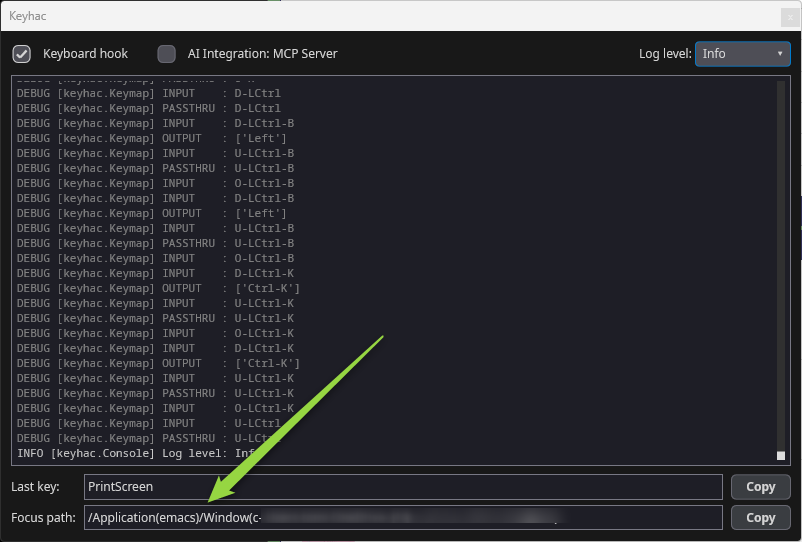
2026-08-25 再追記
ktのグローバルキーマップを Emacs以外でのみ有効にするとした方が、個別にパススルーする設定を入れなくて良さそうなので、custom_condition_func=is_no_emacs を利用してスイッチするようにしました。
こうすると、ktに新しいFakeyemacs風キーバインドを追加しても、自動的に除外されます。
"""Keyhac 2 configuration file.
This file is copied to ~/.keyhac/config.py on first run. Edit that copy —
Keyhac reloads it from the tray menu or the console's hook toggle.
The same file runs on Windows and macOS. Where the OSes genuinely differ,
branch on `keymap.platform`; the two constants set up at the top (LEADER and
MOD) absorb most of it, so the samples below rarely have to.
Everything here is a working example, not pseudo-code. Delete what you do
not want.
"""
import json
from keyhac import *
from keyhac.core.keymap import Keymap
from keyhac.core.const import MODKEY_SHIFT
from keyhac.core.const import MODKEY_ALT
from keyhac.core.const import MODKEY_CTRL
from keyhac.core.const import MODKEY_WIN
from keyhac.core.const import MODKEY_CMD
from keyhac.core.const import MODKEY_FN
from keyhac.ui.chooser import ChooserWindow
from puikit.event import EventType
logger = getLogger("Config")
_EVENT_MODKEYS = {
"shift": MODKEY_SHIFT,
"ctrl": MODKEY_CTRL,
"alt": MODKEY_ALT,
"win": MODKEY_WIN,
"cmd": MODKEY_CMD,
}
def configure(keymap):
mac = keymap.platform == "mac"
# ==================================================================
# Setup
# ==================================================================
# --- user modifier -------------------------------------------------
# Turn a key into User0, a modifier of your own that no application
# sees. User0-User3 are available; a key used this way is never
# emitted, so it loses its original meaning while defined.
if mac:
# The right Option key; it stops acting as Option.
keymap.define_modifier("RAlt", "RUser0")
else:
# The left Windows key; the Start menu no longer opens on a tap
# (bind kt["O-LWin"] = "LWin" below if you want that back).
# keymap.define_modifier("LWin", "LUser0") # 仮想デスクトップ切り替えがうまくいかないので、Winキーを開放
pass
# --- the two portability constants ---------------------------------
# LEADER: the modifier most samples below hang off.
# macOS - the Fn key, which Windows does not expose to software
# Windows - User0, i.e. the left Windows key defined just above
# LEADER = "Fn" if mac else "User0" # 上記の変更に伴い、"User0"
LEADER = "Fn" if mac else "LWin"
# MOD: the OS's primary shortcut modifier, so one binding can mean
# "Cmd-C" on macOS and "Ctrl-C" on Windows.
MOD = "Cmd" if mac else "Ctrl"
# --- swap a key entirely (uncomment to try) ------------------------
# replace_key runs before any key table, so the rest of the config
# only ever sees the replacement.
# keymap.replace_key("CapsLock", "LCtrl")
# --- text editor for "Edit Config" ---------------------------------
# The tray menu's "Edit Config" opens this file. Unset, a default is
# picked (VS Code / Xcode / TextEdit on macOS, Notepad on Windows).
# Name an editor application, or set a callable taking the path:
# keymap.editor = "CotEditor" if mac else "notepad.exe"
# --- clipboard history ---------------------------------------------
keymap.clipboard_history.max_items = 500
keymap.clipboard_history.max_data_size = 10 * 1024 * 1024
# ==================================================================
# Global key table (active everywhere except Emacs)
# ==================================================================
def is_not_emacs(focus):
"""Fakeymacs-style key bindings are disabled in Emacs."""
return focus.app_name.lower() != "emacs"
kt = keymap.define_keytable(
focus_path_pattern="*",
custom_condition_func=is_not_emacs,
)
# ==================================================================
# Fakeymacs-style key bindings
# ==================================================================
# Basic Emacs cursor movement.
kt["Ctrl-B"] = "Left"
kt["Ctrl-F"] = "Right"
kt["Ctrl-P"] = "Up"
kt["Ctrl-N"] = "Down"
kt["Ctrl-A"] = "Home"
kt["Ctrl-E"] = "End"
# Word movement.
kt["Alt-B"] = "Ctrl-Left"
kt["Alt-F"] = "Ctrl-Right"
# Page movement.
kt["Ctrl-V"] = "PageDown"
kt["Alt-V"] = "PageUp"
# Delete / kill.
kt["Ctrl-D"] = "Delete"
kt["Alt-D"] = "Ctrl-Delete"
kt["Alt-Back"] = "Ctrl-Backspace"
kt["Ctrl-K"] = "Shift-End", "Ctrl-C", "Delete"
kt["Ctrl-H"] = "Back"
# Clipboard.
kt["Ctrl-W"] = "Ctrl-X"
kt["Alt-W"] = "Ctrl-C"
kt["Ctrl-Y"] = "Ctrl-V"
# Newline / undo / cancel.
kt["Ctrl-M"] = "Enter"
kt["Ctrl-J"] = "Enter"
kt["Ctrl-O"] = "Enter", "Left"
kt["Ctrl-Slash"] = "Ctrl-Z"
kt["Ctrl-G"] = "Esc"
# Search.
kt["Ctrl-S"] = "Ctrl-F"
kt["Ctrl-R"] = "Ctrl-Shift-F3"
# --------------------------------------------------------------
# Fakeymacs-like C-x prefix
# --------------------------------------------------------------
kt_x_emacs = keymap.define_keytable(name="Emacs-C-X")
kt["Ctrl-X"] = kt_x_emacs
kt_x_emacs["H"] = "Ctrl-Home", "Ctrl-A" # mark whole buffer
kt_x_emacs["Ctrl-F"] = "Ctrl-O" # open
kt_x_emacs["Ctrl-S"] = "Ctrl-S" # save
kt_x_emacs["K"] = "Ctrl-F4" # close tab/window
kt_x_emacs["U"] = "Ctrl-Z" # undo
kt_x_emacs["Ctrl-C"] = "Alt-F4" # quit
# --------------------------------------------------------------
# Clipboard history + categorized preset snippets
#
# Alt-Y opens a custom chooser. Left/Right switches categories,
# Up/Down selects an item, Enter pastes it, and Shift-Enter only
# copies it to the clipboard.
#
# The categories below are intentionally easy to customize.
# Each category is: (icon, label, text/callable).
# --------------------------------------------------------------
clipboard_categories = [
("📋 履歴", None), # populated dynamically
("📧 メール", [
("📧", "gmailメールアドレス", "aaaa@gmail.com"),
("📧", "hotmailメールアドレス", "bbbbb@hotmail.com"),
("✍", "署名", "よろしくお願いいたします。"),
]),
]
class CategorizedChooserWindow(ChooserWindow):
"""ChooserWindow with Left/Right category switching."""
def __init__(self, backend, categories, *args, **kwargs):
self._categories = categories
self._category_index = 0
self._category_titles = [c[0] for c in categories]
self._filter_text = ""
super().__init__(backend, self._category_items(), *args, **kwargs)
def _category_items(self):
title, items = self._categories[self._category_index]
return list(items)
def _category_header(self):
n = len(self._categories)
title = self._category_titles[self._category_index]
return f"← {title} → ({self._category_index + 1}/{n})"
def _labels(self):
# Put the category indicator at the top of the chooser.
return [self._category_header()] + [
f"{item[0]} {item[1]}" if item[0] else item[1]
for item in self._filtered
]
def _on_filter_change(self, text: str) -> None:
# Category header is not part of filtering.
self._filter_text = text
words = [w for w in text.lower().split() if w]
items = self._category_items()
self._filtered = [
item for item in items
if all(w in item[1].lower() for w in words)
]
self._list.set_items(self._labels())
self._list.selected = 1 if self._filtered else 0
self.panel.render()
def _switch_category(self, delta):
self._category_index = (
self._category_index + delta
) % len(self._categories)
# Re-apply the current filter to the new category. This
# avoids relying on undocumented TextEdit methods.
self._on_filter_change(self._filter_text)
def _on_event(self, event) -> None:
if event.type is EventType.KEY:
if event.key == "left":
self._switch_category(-1)
return
if event.key == "right":
self._switch_category(+1)
return
# The first row is the category header. Skip over it
# when navigating with Up/Down.
if event.key in ("up", "down", "pageup", "pagedown"):
delta = {
"up": -1,
"down": 1,
"pageup": -10,
"pagedown": 10,
}[event.key]
if self._filtered:
selected = self._list.selected - 1
selected = max(
0,
min(len(self._filtered) - 1, selected + delta),
)
self._list.selected = selected + 1
self.panel.render()
return
if event.key == "enter":
# Don't select the category header itself.
index = self._list.selected - 1
if 0 <= index < len(self._filtered):
mod = 0
for name in event.modifiers:
mod |= _EVENT_MODKEYS.get(name, 0)
self._finish(self._filtered[index], mod)
return
self.panel.dispatch_event(event)
self.panel.render()
class CategorizedClipboardChooser(ChooserAction):
"""Fakeymacs-style clipboard/snippet chooser with categories."""
_open = None
def __init__(self, categories):
self.categories = categories
def __repr__(self):
return "CategorizedClipboardChooser()"
def _make_categories(self):
categories = []
for title, items in self.categories:
if items is None:
# Clipboard history: Keyhac 2 returns (text, label).
history = Keymap.get_instance().clipboard_history
history_items = [
("📋", label, text)
for text, label in history.items()
]
categories.append((title, history_items))
else:
categories.append((title, list(items)))
return categories
def __call__(self):
from keyhac.ui import runtime
from keyhac.ui.chooser import ChooserWindow
if runtime.backend is None:
logger.error(
"CategorizedClipboardChooser requires the Keyhac UI."
)
return
keymap = Keymap.get_instance()
# Close an already-open categorized chooser.
if self._open is not None:
old_window, old_pid = self._open
old_window.dismiss()
self._open = None
if old_pid is not None and keymap.app_control is not None:
keymap.app_control.activate_pid(old_pid)
return
focus = keymap.focus
original_pid = focus.pid if focus else None
def refocus():
if original_pid is not None and keymap.app_control is not None:
keymap.app_control.activate_pid(original_pid)
def selected(item, modifier_flags):
self._open = None
refocus()
value = item[2] if len(item) > 2 else item[1]
if callable(value):
value = value()
if value is None:
return
keymap.clipboard_history.set_current(str(value))
# Shift-Enter = clipboard only.
if modifier_flags & MODKEY_SHIFT:
return
# Normal Enter = paste into the original application.
runtime.backend.call_later(
0.15,
lambda: self._paste(),
)
def canceled():
self._open = None
refocus()
center_on = clamp_to = None
active = keymap.get_active_window()
if active is not None:
center_on = active.get_frame()
if center_on is not None and keymap.window_provider is not None:
clamp_to = MoveWindow._get_best_screen(
center_on,
keymap.window_provider.screen_frames(),
)
categories = self._make_categories()
chooser = CategorizedChooserWindow(
runtime.backend,
categories,
on_selected=selected,
on_canceled=canceled,
title="Clipboard / Snippets",
center_on=center_on,
clamp_to=clamp_to,
)
self._open = (chooser, original_pid)
if keymap.app_control is not None:
import os
keymap.app_control.activate_pid(os.getpid())
def _paste(self):
keymap = Keymap.get_instance()
with keymap.get_input_context() as ctx:
ctx.send_key(
"Cmd-V" if keymap.platform == "mac" else "Ctrl-V"
)
kt["Alt-Y"] = CategorizedClipboardChooser(clipboard_categories)
# --------------------------------------------------------------
# Application launcher
#
# Alt-L opens a selectable application list.
# Add/remove entries here to match the applications you use.
# --------------------------------------------------------------
def show_application_launcher():
applications = [
("📝", "Notepad", "notepad.exe"),
("📁", "Explorer", "explorer.exe"),
("⌨", "Windows Terminal", "wt.exe"),
("💻", "PowerShell", "powershell.exe"),
("🌐", "Microsoft Edge", "msedge.exe"),
("🌐", "Google Chrome", "chrome.exe"),
("🧑‍💻", "Visual Studio Code", "code"),
]
entries = []
for icon, name, command in applications:
def launch(command=command):
LaunchApplication(command)()
entries.append((icon, name, launch))
ShowClipboardSnippets(entries)()
kt["Alt-L"] = show_application_launcher
# --- key -> key ----------------------------------------------------
# IJKL as arrow keys while LEADER is held.
kt[f"{LEADER}-I"] = "Up"
kt[f"{LEADER}-J"] = "Left"
kt[f"{LEADER}-K"] = "Down"
kt[f"{LEADER}-L"] = "Right"
kt[f"{LEADER}-U"] = "Home"
kt[f"{LEADER}-O"] = "End"
# --- key -> sequence of keys ---------------------------------------
# Select the whole line: Home, then Shift-End.
kt[f"{LEADER}-A"] = "Home", "Shift-End"
# --- one-shot: tap for one key, hold to modify ---------------------
# A one-shot key held down still works as its modifier; only a lone
# tap-and-release fires the assignment. Picked so a stray tap is
# harmless (an Escape here, say, would cancel dialogs mid-typing).
if mac:
# The classic macOS setup: tap Left/Right Cmd alone for Eisu/Kana
# (IME off/on) - a no-op unless a Japanese input source is
# installed. Held, they are still plain Cmd.
kt["O-LCmd"] = "Eisu"
kt["O-RCmd"] = "Kana"
else:
# Tap right Ctrl alone to open the Start-menu search; held, it is
# still plain Ctrl.
kt["O-RCtrl"] = "Win-S"
# --- key -> your own function --------------------------------------
def hello():
# print() and the logger both reach the console window.
print("Hello from config.py")
logger.info(f"platform={keymap.platform}")
kt[f"{LEADER}-H"] = hello
# --- typing literal text -------------------------------------------
kt[f"{LEADER}-Semicolon"] = InputText("me@example.com")
# --- sending keys from your own function ---------------------------
# get_input_context() batches virtual key input; it is safe to use from
# a worker thread as well (see the ThreadedAction sample below).
def wrap_in_quotes():
with keymap.get_input_context() as ctx:
ctx.send_key(f"{MOD}-C")
kt[f"{LEADER}-Q"] = wrap_in_quotes
# ==================================================================
# Clipboard
# ==================================================================
# --- history, in a chooser window ----------------------------------
# Enter pastes; Shift-Enter only sets the clipboard. Type to filter.
kt[f"{LEADER}-V"] = ShowClipboardHistory()
# --- fixed snippets -------------------------------------------------
# (icon, label) | (icon, label, text) | (icon, label, callable)
kt[f"{LEADER}-Shift-V"] = ShowClipboardSnippets([
("📧", "me@example.com"),
("📮", "Mailing address", "400 Broad St, Seattle, WA 98109"),
("🕒", "Date", DateTimeSnippet("%Y-%m-%d")),
("🕒", "Timestamp", DateTimeSnippet("%Y-%m-%d %H:%M:%S")),
("🕒", "For filenames", DateTimeSnippet("%Y%m%d_%H%M%S")),
])
# --- transform whatever is on the clipboard -------------------------
# A tool takes the clipboard text and returns the replacement.
def pretty_json(s):
try:
return json.dumps(json.loads(s), indent=4, ensure_ascii=False)
except json.JSONDecodeError:
logger.error("Clipboard content is not valid JSON.")
return s
kt[f"{LEADER}-Ctrl-V"] = ShowClipboardTools([
("🔄", "Quote", ShowClipboardTools.quote),
("🔄", "Unindent", ShowClipboardTools.unindent),
("🔄", "Upper case", str.upper),
("🔄", "Lower case", str.lower),
("🔄", "Half width", ShowClipboardTools.to_half_width),
("🔄", "Full width", ShowClipboardTools.to_full_width),
("🔄", "Pretty JSON", pretty_json),
])
# ==================================================================
# Windows and applications
# ==================================================================
# --- move the focused window ---------------------------------------
# Apple keyboards translate Fn-Arrow into Home/End/PageUp/PageDown in
# hardware (the Fn modifier itself still arrives), so with LEADER = Fn
# the "...-Left" spellings would never fire on macOS - bind the keys
# that actually arrive there. Ctrl/Alt rather than Shift, because
# Fn-Shift-Arrow is how you *select text* on a Mac laptop (it arrives
# as Shift-Home etc.) - a Shift binding here would steal it.
LEFT, RIGHT, UP, DOWN = (("Home", "End", "PageUp", "PageDown") if mac
else ("Left", "Right", "Up", "Down"))
# Nudge by 20 px...
# kt[f"{LEADER}-Ctrl-{LEFT}"] = MoveWindow(direction="left", distance=20)
# kt[f"{LEADER}-Ctrl-{RIGHT}"] = MoveWindow(direction="right", distance=20)
kt[f"{LEADER}-Ctrl-{UP}"] = MoveWindow(direction="up", distance=20)
kt[f"{LEADER}-Ctrl-{DOWN}"] = MoveWindow(direction="down", distance=20)
# ...or send it as far as it goes, stopping at other windows' edges
# and screen edges (and hopping to the next monitor when already there).
kt[f"{LEADER}-Alt-{LEFT}"] = MoveWindow(direction="left", distance=9999,
window_edge=True, screen_edge=True)
kt[f"{LEADER}-Alt-{RIGHT}"] = MoveWindow(direction="right", distance=9999,
window_edge=True, screen_edge=True)
kt[f"{LEADER}-Alt-{UP}"] = MoveWindow(direction="up", distance=9999,
window_edge=True, screen_edge=True)
kt[f"{LEADER}-Alt-{DOWN}"] = MoveWindow(direction="down", distance=9999,
window_edge=True, screen_edge=True)
# --- snap to screen regions (tiling) --------------------------------
# Resizes to a half of the window's current screen, inside the work
# area (menu bar, Dock and taskbar stay uncovered). Same IJKL layout
# as the arrows above. ratio= picks a different split, e.g.
# SnapWindow("left", ratio=2/3).
kt[f"{LEADER}-Ctrl-J"] = SnapWindow("left")
kt[f"{LEADER}-Ctrl-L"] = SnapWindow("right")
kt[f"{LEADER}-Ctrl-I"] = SnapWindow("top")
kt[f"{LEADER}-Ctrl-K"] = SnapWindow("bottom")
kt[f"{LEADER}-F"] = SnapWindow("full")
# --- minimize the focused window -------------------------------------
def minimize_window():
window = keymap.get_active_window()
if window is not None:
window.minimize()
kt[f"{LEADER}-M"] = minimize_window
# --- bring an application forward -----------------------------------
# Matches like the focus conditions below: wildcards, "|" alternation,
# case-insensitive, ".exe" optional.
kt[f"{LEADER}-1"] = ActivateWindow(app="code|Visual Studio Code")
kt[f"{LEADER}-2"] = ActivateWindow(app="chrome|Google Chrome")
# --- launch an application ------------------------------------------
if mac:
kt[f"{LEADER}-T"] = LaunchApplication("Terminal.app")
else:
kt[f"{LEADER}-T"] = LaunchApplication("wt.exe") # Windows Terminal
# --- inspect windows yourself ---------------------------------------
# keymap.get_active_window() / find_window() / list_windows() return
# portable Window objects: title, app_name, pid, class_name (Windows),
# get_frame(), set_frame(), activate(), minimize(), is_minimized(),
# restore(). Screen geometry: keymap.screen_frames() (whole screens),
# keymap.screen_work_frames() (minus menu bar / Dock / taskbar) and
# keymap.window_frames(). Window objects and screen_work_frames() are
# UI-thread only - never touch them from a ThreadedAction.run(); the
# thread-safe pair there is screen_frames() / window_frames().
def describe_window():
window = keymap.get_active_window()
if window is None:
logger.warning("No active window.")
return
x, y, w, h = window.get_frame()
logger.info(f"{window.app_name}: \"{window.title}\" "
f"at ({x:.0f},{y:.0f}) {w:.0f}x{h:.0f}")
logger.info(f"{len(keymap.list_windows())} windows open on "
f"{len(keymap.screen_frames())} screen(s)")
kt[f"{LEADER}-W"] = describe_window
# --- activate, or launch if it is not running ------------------------
def activate_or_launch_editor():
window = keymap.find_window(app="code|Visual Studio Code")
if window:
window.activate()
else:
LaunchApplication("Visual Studio Code.app" if mac else "code")()
kt[f"{LEADER}-E"] = activate_or_launch_editor
# ==================================================================
# Keyboard macros
# ==================================================================
kt[f"{LEADER}-OpenBracket"] = ToggleRecordingKeys() # record on/off
kt[f"{LEADER}-CloseBracket"] = PlaybackRecordedKeys() # replay
# StartRecordingKeys() / StopRecordingKeys() exist too, if you would
# rather have separate keys than a toggle.
# ==================================================================
# Background work: ThreadedAction
# ==================================================================
# Anything slow (network, subprocess, sleeping) must not run inline -
# it would block the keyboard hook. ThreadedAction gives you a worker
# thread; starting() and finished() run under the engine lock, run()
# does not.
class TypeSlowly(ThreadedAction):
def __init__(self, text):
self.text = text
def starting(self):
logger.info(f"Typing {self.text!r}...")
def run(self):
import time
for char in self.text:
time.sleep(0.05)
with keymap.get_input_context() as ctx:
ctx.send_key(f"Shift-{char}" if char.isupper() else char)
return len(self.text)
def finished(self, result):
logger.info(f"Typed {result} characters.")
def __repr__(self):
return f"TypeSlowly({self.text!r})"
kt[f"{LEADER}-Y"] = TypeSlowly("keyhac")
# ==================================================================
# Multi-stroke key tables
# ==================================================================
# Press LEADER-X, then a second key. A balloon shows the table's name
# while it is armed.
kt_x = keymap.define_keytable(name="LEADER-X")
kt[f"{LEADER}-X"] = kt_x
kt_x["C"] = f"{MOD}-C"
kt_x["V"] = f"{MOD}-V"
kt_x["S"] = f"{MOD}-S"
# --- balloon messages of your own ------------------------------------
def show_balloon():
# Absent when running with --no-ui, so ask before using it.
pop = getattr(keymap, "pop_balloon", None)
if pop:
pop("hello", "Keyhac is running", 2.0)
kt[f"{LEADER}-B"] = show_balloon
# ==================================================================
# Application-specific key tables
# ==================================================================
# Tables are merged in definition order and later ones win, so anything
# below overrides the global table for the apps it matches.
# --- by application name (portable) ----------------------------------
kt_browser = keymap.define_keytable(app="chrome|Google Chrome|firefox|Safari")
kt_browser[f"{LEADER}-R"] = f"{MOD}-R" # reload
# --- by window title -------------------------------------------------
# kt_docs = keymap.define_keytable(title="*Google Docs*")
# --- by Win32 window class (Windows only) -----------------------------
if not mac:
kt_notepad = keymap.define_keytable(app="notepad", class_name="Edit")
kt_notepad[f"{LEADER}-D"] = "Home", "Shift-Down", "Shift-End", "Delete"
# --- by focus path ----------------------------------------------------
# The focus path is the control hierarchy down to the focused element -
# the AX tree on macOS, the UI Automation tree on Windows. Watch the
# console's "Focus path" field to see the live value, and use "*" freely
# to skip levels.
# macOS : /AXApplication(Xcode)/AXWindow(...)/.../AXTextArea()
# Windows : /Application(Code)/Window(...)/.../Edit(Message input)
# Note the trailing "(*)": a component is "Role(Name)", and many controls
# do carry a name, so "*/Edit()" would only match unnamed ones.
kt_textarea = keymap.define_keytable(
focus_path_pattern="*/AXTextArea(*)" if mac else "*/Edit(*)")
kt_textarea[f"{LEADER}-Slash"] = InputText("# ")
# --- by your own test -------------------------------------------------
# custom_condition_func receives the portable Focus object: app_name,
# window_title, class_name (Windows), path, and element - the focused
# element in the OS's own vocabulary.
def is_terminal(focus):
if focus.app_name in ("Terminal", "iTerm2", "WindowsTerminal", "cmd",
"powershell", "pwsh"):
return True
# Element attributes differ per OS: AX names on macOS, UI Automation
# names on Windows. An unknown name simply reads back as None.
element = focus.element
if element is None:
return False
role = element.get_attribute_value("AXRole" if mac else "ControlType")
return role in ("AXTextArea", "Document")
kt_terminal = keymap.define_keytable(custom_condition_func=is_terminal)
kt_terminal[f"{LEADER}-K"] = "Ctrl-K" # clear, rather than "Down"
# ==================================================================
# More to explore
# ==================================================================
# keymap.focus - the current Focus (app_name, window_title,
# class_name, path, element, native)
# keymap.replay_buffer - the macro buffer behind the record actions
# keymap.clipboard_history.items() / set_current(text)
# Opening a URL or a file: import subprocess and run
# subprocess.Popen(["open", url] if mac else ["cmd", "/c", "start", url])
#
# Full reference: doc/configuration.md in the Keyhac 2 source tree.